Introduction
Are you thinking about stepping away from Facebook but confused about whether to deactivate your Facebook account or delete Facebook permanently? You’re not alone. Many people assume both options mean the same thing—but they’re actually very different.
-
Deactivation is like pressing “pause.”
-
Deletion is like throwing the whole system away for good.
In this guide, we’ll explain the differences, pros and cons, and step-by-step instructions so you can make the best decision for yourself.
What Does Deactivating a Facebook Account Mean?
When you deactivate your Facebook account, you’re basically taking a temporary break. Your profile disappears from searches and friend lists, but Facebook still keeps all your data safe for when you decide to return.
Key Features of Deactivation
-
Your profile and timeline stay hidden from everyone.
-
Friends can’t see your posts, though old comments and messages may still show up.
-
You can reactivate anytime by logging back in.
-
Facebook stores your photos, friends, and posts for future use.
What Does Deleting a Facebook Account Mean?
Choosing to delete Facebook permanently means cutting ties for good. Once confirmed, Facebook gives you around 30 days to change your mind. After that, your account, photos, posts, and connections are erased forever.
Key Features of Deletion
-
All your Facebook data is permanently removed.
-
You lose access to Messenger and other connected apps.
-
After 30 days, there’s no way to recover your account.
Deactivation vs Deletion: The Main Differences
Here’s the quick breakdown:
-
Deactivation = temporary, reversible, like hibernation.
-
Deletion = permanent, final, no turning back.
Comparison Table
| Feature | Deactivation | Deletion |
|---|---|---|
| Profile visibility | Hidden | Completely removed |
| Messages | Still visible to others | May remain in recipient inbox |
| Data storage | Kept safely by Facebook | Deleted after 30 days |
| Reversibility | Can log back in anytime | Cannot be restored |
| Messenger access | Still works | Disabled (unless separate account) |
Why People Deactivate Their Facebook Account
Many users choose to deactivate Facebook instead of deleting because:
-
They want a temporary digital detox.
-
They need fewer distractions during work or exams.
-
They value privacy but don’t want to lose years of posts and memories.
Why People Delete Facebook Permanently
On the other hand, some people decide to delete Facebook forever because:
-
They want a complete digital break.
-
They don’t trust Facebook’s data collection.
-
They prefer other social platforms like Instagram, TikTok, or LinkedIn.
Pros and Cons of Deactivation
Pros:
-
Can reactivate anytime.
-
Keeps your data safe.
-
Great for short-term breaks.
Cons:
-
Old comments and messages may still be visible.
-
Easy to give in and return too soon.
-
Doesn’t fully address privacy concerns.
Pros and Cons of Deletion
Pros:
-
Permanent removal of all data.
-
Zero distractions and full freedom.
-
No more risk of unwanted data tracking.
Cons:
-
Lose all posts, photos, and memories.
-
Can’t manage groups or pages anymore.
-
Messenger access disappears if linked.
How to Deactivate a Facebook Account (Step by Step)
-
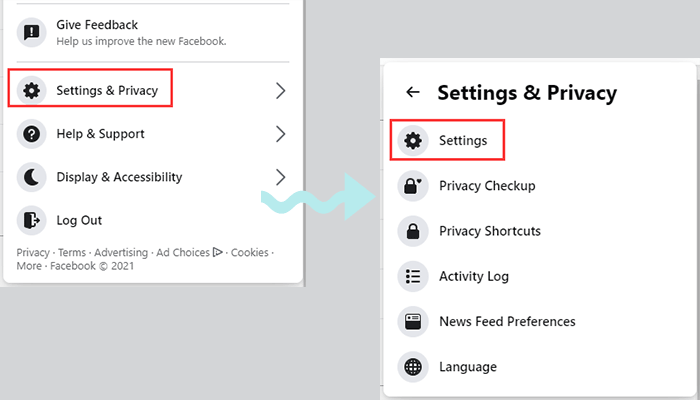
Open Settings & Privacy > Settings.
-
Click on Your Facebook Information.
-
Select Deactivation and Deletion.
-
Choose Deactivate Account.
-
Enter your password and confirm.
How to Delete a Facebook Account Permanently (Step by Step)
-
Go to Settings & Privacy > Settings.
-
Select Your Facebook Information.
-
Click Deactivation and Deletion.
-
Choose Delete Account.
-
Continue to deletion and confirm with your password.
Things to Do Before You Delete Facebook
Before you delete Facebook permanently, consider:
-
Downloading all your photos, videos, and posts.
-
Saving important contacts.
-
Checking apps and games linked to Facebook (Spotify, games, etc.) that may stop working.
Should You Deactivate or Delete Facebook?
Here’s the rule of thumb:
-
Deactivate Facebook → Best for short breaks.
-
Delete Facebook permanently → Best if you’re ready for a complete digital reset.
Alternatives to Deactivation or Deletion
If you’re not sure about either, try these alternatives:
-
Set screen-time limits with apps.
-
Adjust Facebook privacy settings.
-
Unfollow or mute accounts instead of leaving completely.
Conclusion
At the end of the day, choosing between deactivation and deletion depends on your goals.
-
Deactivation is like taking a nap—you can wake up anytime.
-
Deletion is like moving out permanently—you can’t come back.
Before you decide, think about your data, privacy, and how much Facebook really matters in your daily life.
FAQs
1. Can I still use Messenger if I deactivate Facebook?
Yes, Messenger still works even when your account is deactivated.
2. Can I reactivate after deleting Facebook?
No. Once the 30-day grace period ends, deletion is final.
3. How long does Facebook keep my data?
Deactivated accounts are stored indefinitely, but deleted accounts are erased after 30 days.
4. Will people know if I deactivate my account?
No. Your profile simply disappears—Facebook doesn’t notify anyone.
5. What happens to groups or pages I manage?
If you deactivate, they stay active. If you delete, assign another admin first or the group/page may suffer.